
When fishermen cannot go to sea, they repair their nets is a well used metaphor regarding productivity during downtime that neatly sums up my Christmas and New Year period.
Something that had been nagging me for a good while now is the apparent erosion in willingness of participants to be as fully present in online workshops as they once were, and I concluded that whatever the reason, it was up to me to do something about it. As a freelancer with relatively few resources, a theatrical background and a love of creative solutions – I pride myself on delivering online workshops that punch above their weight, and I felt it was time to give my punch a bit more variety. Drawing inspiration from a television programme from my childhood called Vision On, a number of YouTube videos that have memorably held my attention and a keynote speech I once saw, I set to work. Having decided on the qualities and functions that I wanted to realise, I spent a number of weeks redesigning my Zoom broadcast system before digging through boxes of cables and repurposing old kit. Then it was a case of reconfiguring some of the software and most of the technology I use for online delivery from my home office.
I’ve since tested it in two workshops, received feedback that included specific positive references to the new architecture, and have pronounced myself satisfied. So this post is for other freelancers who provide their work in a similar way, and who may be interested.
I was lucky enough to see the late Sir Ken Robinson’s last public, in-person appearance – an intimate evening at the Roundhouse in London on January 21st 2020. There might have been about one hundred or so people there that night, and once we had been ushered into the space, we all waited expectantly. I was there on my own, and so passed the time checking my phone, looking around the room, up at the lights and studying the other people in the audience. After a while I looked to the side of the auditorium and noticed that he was already there, standing in a doorway just a few feet away and chatting with someone. He seemed neither trying to hide nor be recognised; he was just in conversation, and after a few minutes made his way slowly to the front while acknowledging various people in the audience that I assumed he knew, and then began. I remember being captivated not just by seeing one of my favourite speakers in the flesh, but also by the line between private moment and public performance being almost indistinguishable. The blurring seemed to effortlessly blend backstage into onstage and private thought into public statement. Wanting that feeling of safety, ease and welcome for the beginning of my workshops gave me the idea of what Chat GPT has since christened the vibe cam, a wide angled camera mounted high up and to the side of my desk that makes the first moments of a Zoom call with me an over-the-shoulder view of my backstage workspace; my desk strewn with pieces of paper, post-it notes, pairs of glasses, lights, a water bottle, monitors, wires and my coffee cup. This is how I now welcome my audience, invite them in, chat about the day and perhaps the weather while I make my final preparations. No pressure, no expectations and no need to do anything except get settled.

With the ability to display and hide graphics on any view at the click of a button, I can put a QR code on the screen for the audience to register their attendance, and it’s also the view I sometimes use when they come back from a break. Once they are settled and I am ready, it takes one click of a button to cross face from the vibe cam to the main cam on which I facilitate discussions, invite contributions and sometimes display infographics or relevant websites.

I’ve long preferred to present standing as it gives me better control of my energy and my voice. With a single button press, a brief one-second crossfade gives me just enough time to stand, before the view switches to the presenter cam, which is a tracking cam that can follow me if I move, and is positioned at standing height and set back from my desk. With the help of a green screen behind me, I design my slides with a space for me within them, allowing me to interact with the material as directly as I do with the audience.

With presentations given on my feet and facilitation taking place seated, I also want the chance to create real-time, hand-drawn images – a deliberately low-tech alternative to on-screen graphics that lets people see my thinking as it happens. I can’t draw to save my life and have handwriting that even a doctor wouldn’t be able to decipher, but I do think there is something engaging about watching someone sketch out ideas on a Flipchart, and my new overhead cam, combined with an ageing iPad, gives me the chance to do just that while I hear Left Bank Two (the theme tune from Vision on) playing in my head.

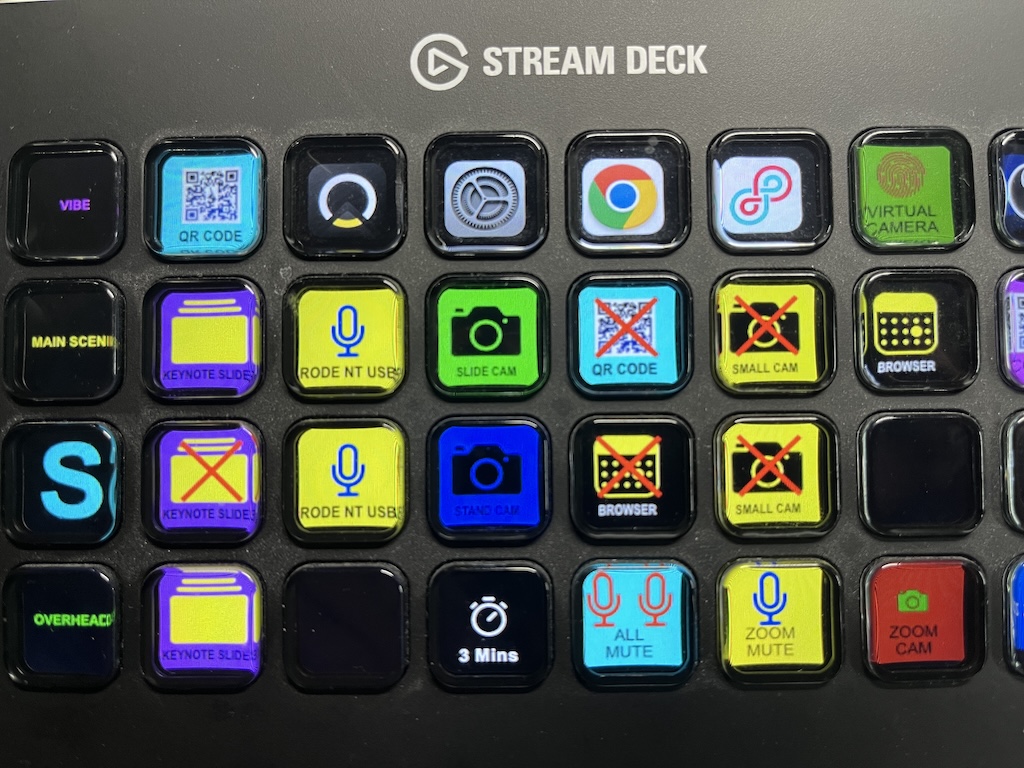
OBS (Open Broadcaster Software) is where all these artistic decisions about how my workshop should look on camera are assembled into something coherent. It receives multiple live inputs – cameras, slides, graphics, browser windows – and combines them into the four distinct scenes described and shown above. They are controlled by a piece of equipment called the Stream Deck, a photo of which is the main image for this post. It’s a bank of programmable buttons that allow me to choose what my audience sees, when, and for how long. Their job is to remove friction and allow me to preserve momentum, which means my audience can enjoy the variety that live vision mixing brings and their focus can remain where it belongs: on the ideas being shared, rather than the machinery required to share them.
It’s important to say that none of this technology improves the content or makes the workshops I give inherently better. It doesn’t and that isn’t the point. Its purpose is to help a solo facilitator work effectively with limited resources. It allows for televisual variety in an online environment: by crossfading smoothly between different states for presenting and facilitating, by panning to a place where hand drawn scribbles offer relief from polished graphics, and through widening the shot to a natural scene of intimacy that comes from letting an audience see the human moments where backstage and onstage briefly overlap.
Whether all this effort to mend my nets translates into a bigger catch remains to be seen of course, but the process of designing and realising these changes has been fascinating, and it has made my workshops even more enjoyable to deliver. If you want to swap ideas about how to make online workshops more effective or discuss any aspect of what I share in this post, get in touch!